Tuesday, 22 August 2017

How to handle the windows, frames and pop up in Selenium WebDriver?

In this post, I will explain that how do you handle the multiple windows, frames, and pop-up of an application using Selenium WebDriver. You generally faced these types of a problem of frames, windows, and pop-up in an application. Different tabs are also treated as different windows. In software automation, you need to tell the Selenium WebDriver that where it will search for the element. In which frame window or pop up.


So to handle this situation selenium WebDriver has native methods. I have mentioned below different ways to handle the windows, frames, and pop-up.


How to handle Frames:-

1) Select frame by element
Ex:- driver.switchTo().frame(element);
2) Select frame by id:-
Ex:- driver.switchTo().frame(id);
3) Select frame by index:-
Ex:- driver.switchTo().frame(index);
How to handle Windows:-

1) Select Window From Index
Set<String> windows = driver.getWindowHandles();
System.out.println("Window Size::" + windows.size());
String wins[] = windows.toArray(new String[windows.size()]);
driver.switchTo().window(wins[WindowCountToSwitch]);


2) Close Window From Index
                      Set<String> windows = driver.getWindowHandles();
System.out.println("Window Size::" + windows.size());
String wins[] = windows.toArray(new String[windows.size()]);
driver.switchTo().window(wins[WindowCountToSwitch]);
driver.close();
Note:- WindowCountToSwitch is the count of the window to select or delete


How to handle the Pop Up:-


1)Handle pop Up:-
                       Alert alert = driver.switchTo().alert();
alert.accept();


2)Get Alert Text:-
                      Alert alert = driver.switchTo().alert();
            String message = alert.getText();


3)check for the visibility of Alert:-
                       WebDriverWait wait = new WebDriverWait(driver, 60);
wait.until(ExpectedConditions.alertIsPresent());

Switch to Default/main window or frame:-
driver.switchTo().defaultContent();

Thank you for visiting my blog. Keep in touch.

Labels: , , , , , , , , ,

Saturday, 12 August 2017

How to Install Maven?

How to Install Maven?

Prerequisite
Steps to Install Maven

1) Download Maven from link and unzip it at your preferred location.
  • apache-maven-3.5.0-bin.zip for Windows
  • apache-maven-3.5.0-bin.tar.gz for Linux
  • apache-maven-3.5.0-bin.tar.gz for Mac
2) Now you need to set Maven environment variables
Add MAVEN_HOME, MAVEN, MAVEN_OPTS to environment variables.

  • For Windows, set the above environment variables.
    MAVEN_HOME=MAVEN unzip directory path\apache-maven-3.5.0MAVEN=%MAVEN_HOME%\binMAVEN_OPTS=-Xms256m -Xmx512mAppend the string ;%MAVEN% to the end of the system variable, Path.
  • For Linux, open command terminal and set the above environment variables.
    export MAVEN_HOME=MAVEN unzip directory path\apache-maven-3.5.0export MAVEN=%MAVEN_HOME%\binexport MAVEN_OPTS=-Xms256m -Xmx512mexport PATH=$MAVEN:$PATH
    • For Mac, open command terminal and set the above environment variables.
    • export MAVEN_HOME=MAVEN unzip directory path\apache-maven-3.5.0
      export MAVEN=%MAVEN_HOME%\bin
      export MAVEN_OPTS=-Xms256m -Xmx512m

      export PATH=$MAVEN:$PATH


        3) Verify Maven installation
        • For Windows, open command console and type "mvn --version". If you've done the setup correctly, this command will provide you the version of installed Maven. 
        • For Linux, open command terminal and type "mvn --version". If you've done the setup correctly, this command will provide you the version of installed Maven.
        • For Mac, open terminal and type "mvn --version". If you've done the setup correctly, this command will provide you the version of installed Maven.

        Congratulations! you have successfully done the Apache Maven setup for all your projects.

        Labels: , , , , , , , , , ,

        Monday, 1 May 2017

        Selenium IDE

        Selenium IDE is the simplest tool to use. It is a Firefox plugin which record user actions and then play when needed.


        How to use:-


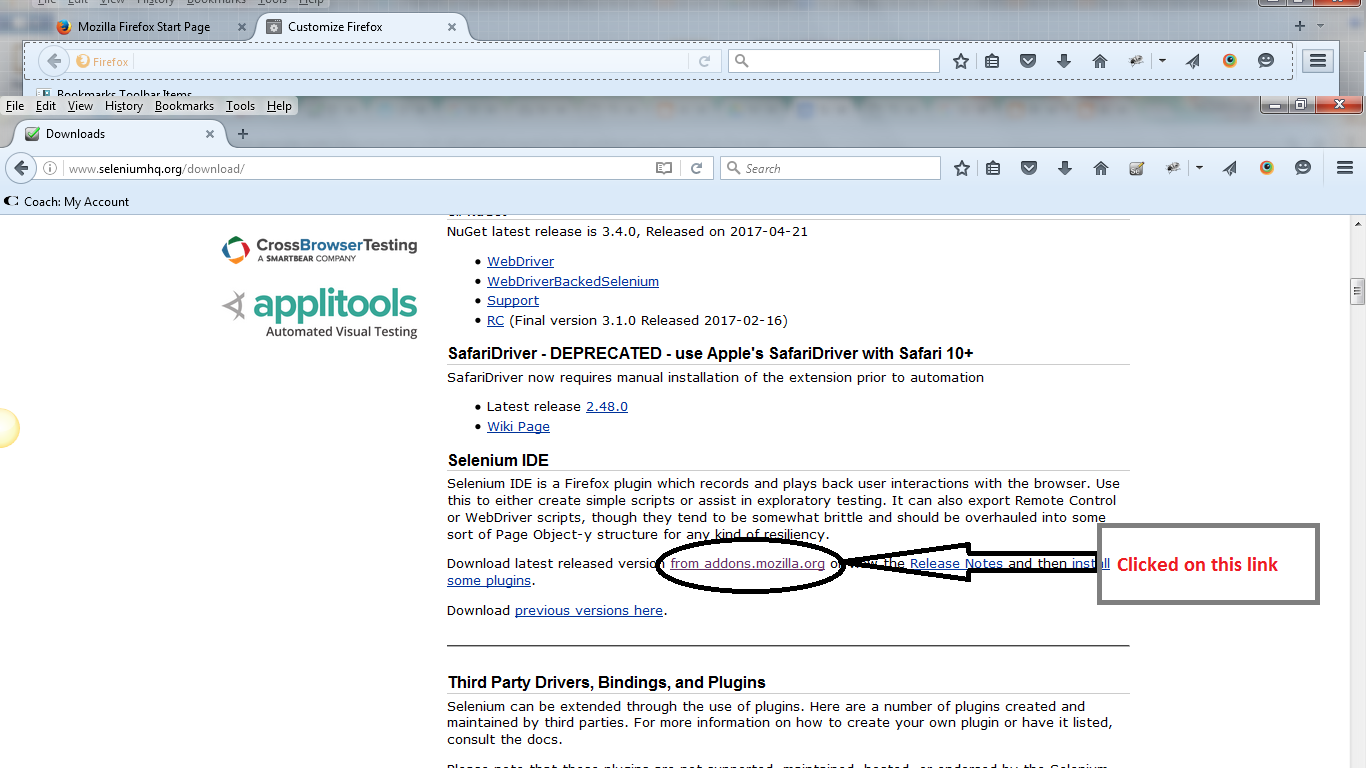
        1. Go to http://www.seleniumhq.org/download/ and then under under Selenium IDE portion  click  on from addons.mozilla.org

          seleniumhq.png
        Clicked on ‘Add to Firefox’

        addtofirefox.png

        3) Clicked ‘Se’ icon to access Selenium IDE

        ideaccess.png

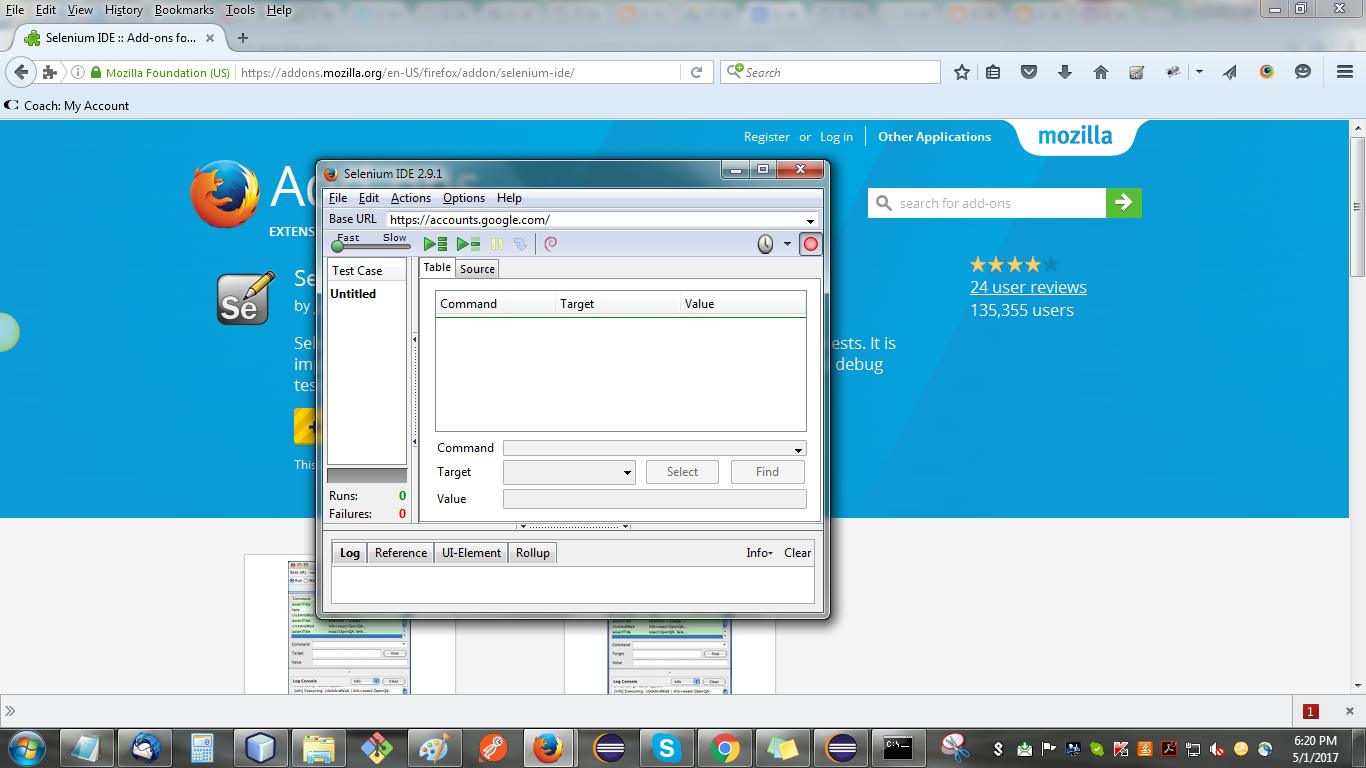
        4) Selenium IDE tool

        readyide.png

        5) For using this tool please refer http://www.guru99.com/introduction-selenuim-ide.html Believe me its too simple to use it. If still faces challenges comment me

        Next blog on Selenium WebDriver

        Labels: , , , ,

        About Selenium

        Not including the part of Selenium history and so on. Start with basic knowledge

        Selenium Mainly has 4 parts

        1) Selenium IDE
        2) Selenium Grid
        3) Selenium WebDriver
        4) Selenium RC

        Selenium IDE:-

         Selenium IDE is a simplest part of selenium. It is a Firefox plugin which records user actions on browser and play it later like QTP. No prior programming language needed for using it.

        Selenium Grid:-

        Selenium Grid provides the facility to execute your tests parallel on different machines. Eaisest way to test your tests on different browsers with different system configurations.

        Selenium WebDriver:-

        Selenium WebDriver supports multiple browsers along with many OS.Provide customize way to perform actions on browser along with different tools integrations. The most famous and usable part of Selenium Suite

        Selenium RC:-
        It's now deprecated

        Next blog on "Selenium IDE" 

        Labels: , , , ,

        Sunday, 30 April 2017

        Why Selenium?

        Before start with Selenium, There are lots of question regarding Selenium Like

        Why Selenium?

        1)Selenium is a an open source software testing tool

        2) Selenium supports almost every browser(IE , Chrome, Firefox, opera, Edge, Safari etc)

        3)Can be used in, almost every OS (Windows, linux, Mac, Android, IOS and so on)

        3)Support multiple programming  languages like Python, Pearl, Ruby, PHP, .NET (C#) and Java.

        4)Many ways to locate a UI element such as Xpath, Css etc

        5)Selenium can integrated with several different tools like Maven, TestNG, Junit and so on.

        6)Selenium tool can be implemented with any test framework such as Hybrid, Keyword Driven,             Data  Driven and so on

        7)Supports parallel test executions

        8)Service layer testing could be integrate with Selenium

        9)Database testing also can be implemented with Selenium


        I believed that now picture become more clear why prefer Selenium 

        Next post is "About Selenium"

        Labels: , , ,

        Saturday, 29 April 2017

        What is Automation Software Testing?

        First post of mine is about Selenium importance in Automation Testing and answers for some common questions about Selenium


        Nowadays, every other engineer is moving towards Software Testing. High market value of QA engineers is motivating IT engineers to learn about testing.

        Software Testing has two major roles:
        1. Manual Tester
        2. Automation Tester
        Higher salary desire of IT Engineers pushes them to move towards Automation Testing and it's not that difficult to learn if they want. Before going deep into Automation Testing, you should understand that Selenium is the most popular free open source automation testing tool. Anyone with just a little knowledge of any programming language can learn Selenium and earn handsome amount.
          There are way too many tutorials available on internet regarding Selenium, but a true learner just can't decide where to start from. I've got lots of queries regarding the same, so decided to give them a good start from this post.
            Before continuing, let me tell you one thing that it doesn't matter what you know and which branch of engineering you belong to. I've heard people say they are not good at any programming language, as they are from a non-technical background. My friends, don't worry about that, as Selenium and programming languages are two different things.

            While doing automation, you need to write some logic and if you also want to maintain your code, you will need some OOPS (Object Oriented Programming System) concepts.

            What do we do in Manual Testing?

                  We can perform only 3 actions on any site
            1. Click
            2. Select
            3. Enter data  
            So basically we automate these actions on any given web application through Selenium.

            Now wait for my next post to know "What is Selenium?"

            Labels: , , , , ,